Playbooks
How to explain a pull request without walking someone through the diff
One sentence, then the shape, then a walk through it. A method for handing a code change to a reviewer, a teammate in another time zone, or someone who does not read code.

Three moves, in this order. Say in one sentence what the change does to the system. Show its shape, so the sentence has somewhere to land. Then walk it, one step at a time, in a form the other person can replay without you. The reason to do it in that order is timing: LinearB's 2026 benchmarks, from 8.1 million pull requests across more than 4,800 organisations, found AI-generated pull requests wait over 16 hours for a reviewer to pick them up, against roughly 200 minutes for human ones. Whoever you are explaining this to is probably asleep, and your explanation has to work without you.
Start with one sentence about the system
The sentence has to say what the system does now that it did not do before. Most descriptions summarise the diff instead, which tells the reader nothing the file list did not already.
"The signup route no longer sends the welcome email itself; it publishes to a queue, and a new worker sends it and records the send."
That sentence has a subject, a change of responsibility, and a new component. Somebody who knows the codebase can now predict most of the diff from it, and somebody who does not knows exactly which question to ask. Compare it to the sentence people actually write, which is "refactors welcome email handling", and which could mean nine different changes.
The test is whether the sentence names something that moved. If your sentence would still be true after you reverted the branch, it is a topic, not an explanation.
Show the shape, so the sentence has somewhere to land
The sentence is doing a lot of work and it is doing it in the reader's head, which is where their working memory already lives. This is the part the Coldtea essay behind PR Lens is about: the one thing review cannot automate is building a shared mental model, and a wall of prose is a poor way to hand one over.
So give the sentence a picture. The change in the render at the top of this post is exactly the one above: the signup route in amber because it changed, a new queue and a new worker in green, the old inline mailer struck through in red, and the user store sitting there untouched because it did not move and it still matters.
That last part is the bit people leave out of hand-drawn explanations. The components the change did not touch are what make the change legible. Draw only what moved and you have drawn a patch. Draw the patch inside the system and you have drawn a change.
Salesforce's engineering team put the same problem the other way round: agent-written pull requests span backend, configuration, tests and UI without preserving the narrative structure a human author would have given them. If the change arrived without a story, an explanation of it has to supply one, and a picture supplies it faster than paragraphs do.
Walk it, at the reader's pace
A shape answers "what is this". It does not answer "in what order", and order is where most questions actually are.
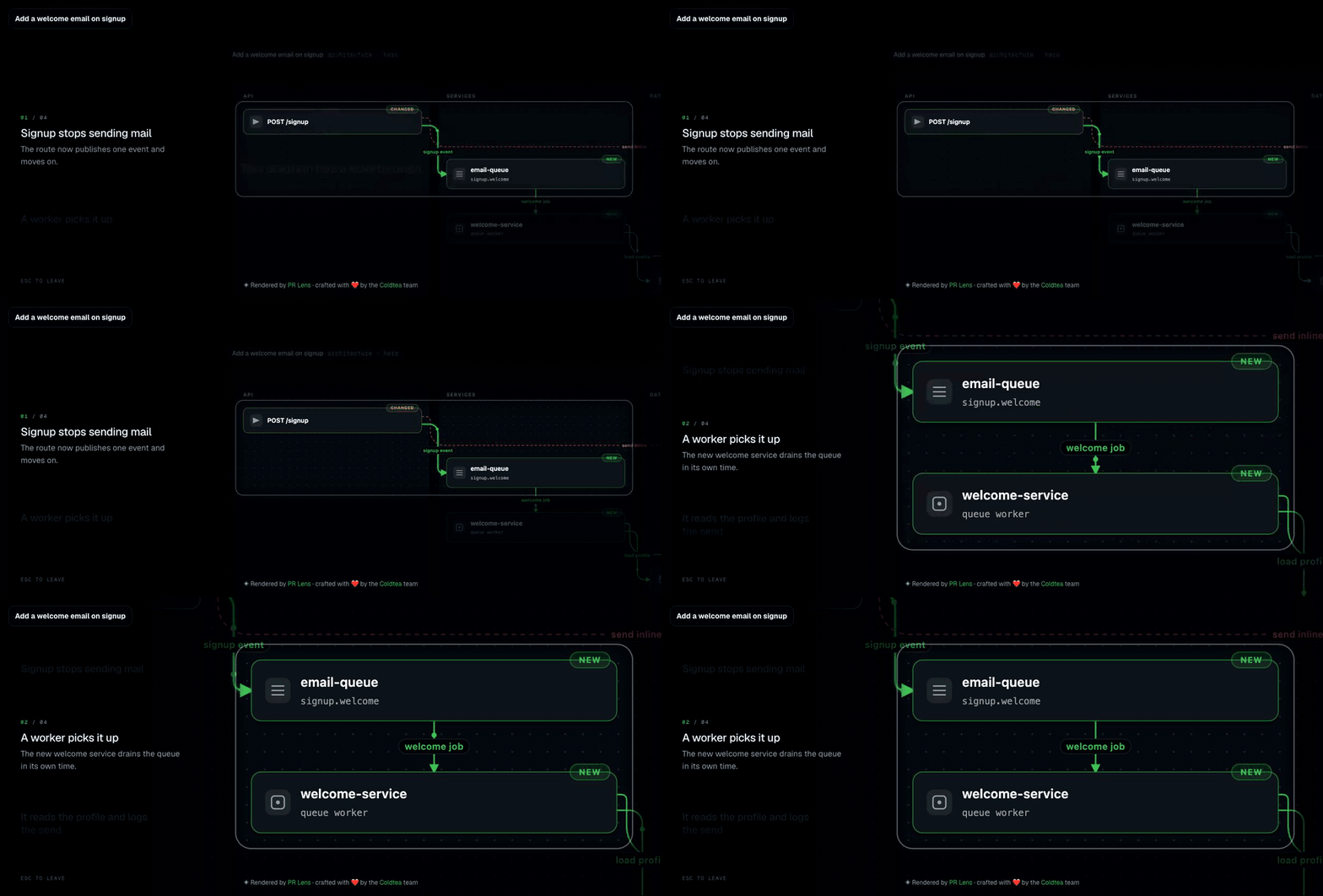
A walkthrough is a small, boring format that works. Dim everything, light the two or three components involved in one step, say one line about what happens there, then move to the next. In PR Lens it is on the canvas: press play, or W, and it tours the change a step at a time, flying to the part of the diagram each step describes.
The thing that makes it better than a screen share is that the reader drives. They can stop on step two, zoom into the worker, go back, and come at it again after lunch. A recorded video cannot do any of that, and it is out of date the moment somebody pushes.
What a good pull request walkthrough looks like goes through how to write the steps, which is mostly a matter of resisting the urge to narrate every file.
Send a link, not a meeting
Every PR Lens comment links to a canvas, which is the same diagrams at full size with pan, zoom and a light or dark theme.
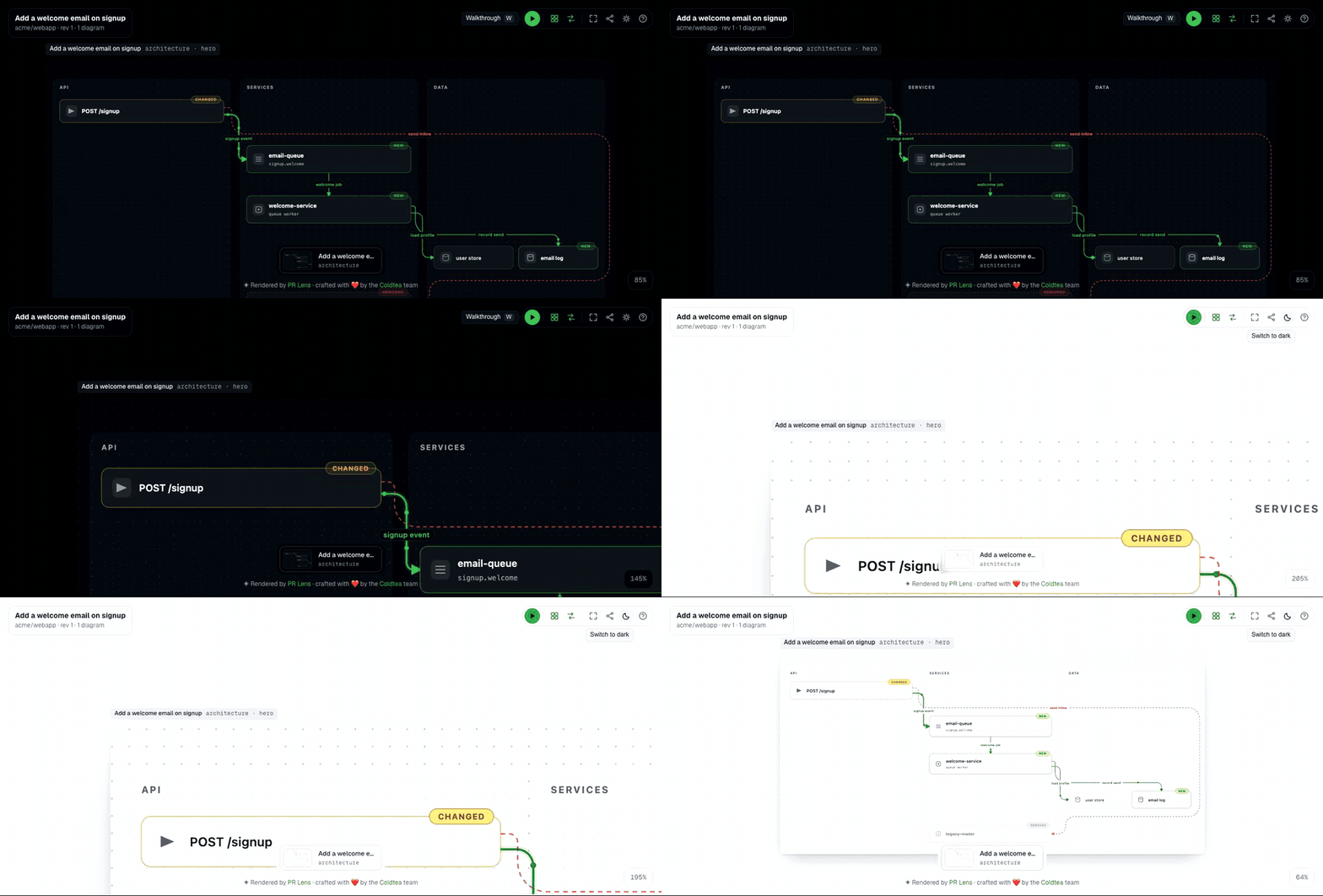
There is also a share page for the pull request itself, at prlens.dev/s/<owner>/<repo>/<number>. It carries the pull request's own title from GitHub and every diagram drawn for it, on the same canvas, opened on the one your link named. For a public repository it just opens. For a private one the link carries a token tied to the graph's current head, so the link you send is scoped to the version of the change you were talking about.
That is the artefact I actually paste into Slack. It survives being forwarded, it opens on a phone, and the person who reads it three hours later reads the same thing you did.
You have explained a change when the other person can repeat what it does without you in the room.
Explaining it to someone who does not read code
Product managers, designers, support, the person who has to write the release note. They do not want the diff and they are usually not asking for one. They are asking a systems question: what happens now when someone signs up, and what happens if the email does not go out.
A drawn change answers that without translation, because the boxes are things they already have names for. The route, the queue, the worker, the email log. Green is new, amber is touched, red is gone. I have watched non-engineers read one of these correctly on first sight, which is not something I have ever watched happen with a diff.
Two things to do when you send it to that audience. Send the canvas link rather than an image, so they can zoom into the part they ask about instead of asking you to screenshot it. And keep your one sentence attached to the link, because a diagram with no sentence is a puzzle.
For the author: do this before you open the pull request
The best time to build the explanation is while the change is still yours.
Draw it locally with the CLI, or ask the coding agent that wrote it: npx skills add coldteadotai/pr-lens installs a skill that works in Claude Code, Cursor, OpenCode and anything else that speaks Agent Skills, and it reasons with the model the agent already runs, so there is no key to set up. Then look at the picture before anyone else does.
Often this changes the pull request rather than the description. A component in the wrong lane, a duplicate of a helper that already exists, a path you did not intend to add. Fixing that before review is cheaper than explaining it during review, which is the argument in diagram the change before you open the pull request.
When you do need the diff
Some things only exist in the lines: a regular expression, an off-by-one, a permission check, a query that will table scan in production. If the conversation is about one of those, open the file and talk about the file.
The point of everything above is to get to that conversation in the first two minutes instead of the twentieth. It is the same reason the first pass in a ten-minute review is the shape rather than the code, and it is the whole argument of the complete guide to reviewing AI-generated pull requests: understanding a change and reading a change are two different jobs, and doing them in the wrong order costs you both.
Questions people ask
How do I explain a code change to a teammate without a call?
- Write one sentence naming what the change does to the system, send a picture of its shape, then send a walkthrough they can play in their own time. The sentence tells them whether to care, the shape tells them where it lands, and the walkthrough gives them the order things happen in. A screen share does all three and only for the people who were awake.
What should a pull request description contain?
- The why. Intent, the constraint you were working under, what you tried first and abandoned, and the decision you want checked. Leave what changed to a diagram or the file list, because that part the reader can see and the reasoning they cannot. A description that narrates the diff is the one thing nobody reads twice.
How do I explain a technical change to a non-engineer?
- Show the components and the arrows between them, without the code. A diagram of a change reads as a system to anyone who has used the product, and the delta colours say what is new, what moved and what is gone. Send a link they can open in a browser rather than a screenshot, so they can zoom into the part they ask about.
Is a recorded video a good way to explain a pull request?
- It is better than nothing and worse than a link. A video is watched at the narrator's pace, cannot be searched, cannot be re-checked against the code, and is stale the moment the branch moves. A walkthrough attached to a drawn change is stepped through at the reader's pace and is redrawn on the next push.
Sources
Keep reading
Turn it on
Add PR Lens to GitHub, GitLab or Bitbucket, and every new pull request is explained and reviewed. Or paste the prompt into the coding agent you already use