Diagrams
What a good pull request walkthrough looks like (and why it is not a video)
A walkthrough is a few steps, each pointing at one part of one diagram and saying one line about it. Here are the four steps of a real one, and why a screen recording cannot do the same job.

A good walkthrough of a pull request is three to seven steps. Each one shows a single diagram, points at one part of it, and says one line about what happened there. It plays in the browser next to the change, it takes under a minute, and it is generated from the same document that drew the diagram, so it cannot describe a version of the code that no longer exists. That last property is the one a screen recording can never have, and it is the difference between a tour that is still true next week and one nobody trusts. The audience for it is larger than it looks: of 33,596 agent-authored pull requests studied in 2026 (arXiv 2605.02273), 61.38% received no recorded review at all.
What a walkthrough actually is
In PR Lens it is a field on the graph document. A tour has between two and twelve steps, and each step carries four things:
- a heading, up to 48 characters, naming the thing and what happened to it,
- one line of body, up to 140 characters, on what that means for behaviour,
- a stage, which is the diagram the step plays over, or nothing at all to stay on the diagram the reader arrived on,
- a focus, which is either the whole diagram or a list of lanes, nodes, edges and flow steps named by id.
The body is required. A heading with nothing under it reads as a step someone started and never finished, so the parser rejects it. The caps are part of the contract rather than advice, because the reading column shows one line per step and a heading long enough to wrap turns a tour into a wall of text. No producer can pad its way past them.
Four steps from a real one
Here is the whole walkthrough for the change in the diagram above, a signup route that stops sending mail inline. This is the document, not a paraphrase of it.
| Step | Heading | Line | What it points at |
|---|---|---|---|
| 01 | Signup stops sending mail | The route now publishes one event and moves on. | POST /signup, email-queue, and the event edge between them |
| 02 | A worker picks it up | The new welcome service drains the queue in its own time. | email-queue, welcome-service, the queue edge |
| 03 | It reads the profile and logs the send | One store it already had, one it gets in this change. | welcome-service, user store, email log, both write edges |
| 04 | The inline mailer is gone | Nothing calls it any more, so it leaves with this change. | legacy-mailer and the removed call into it |
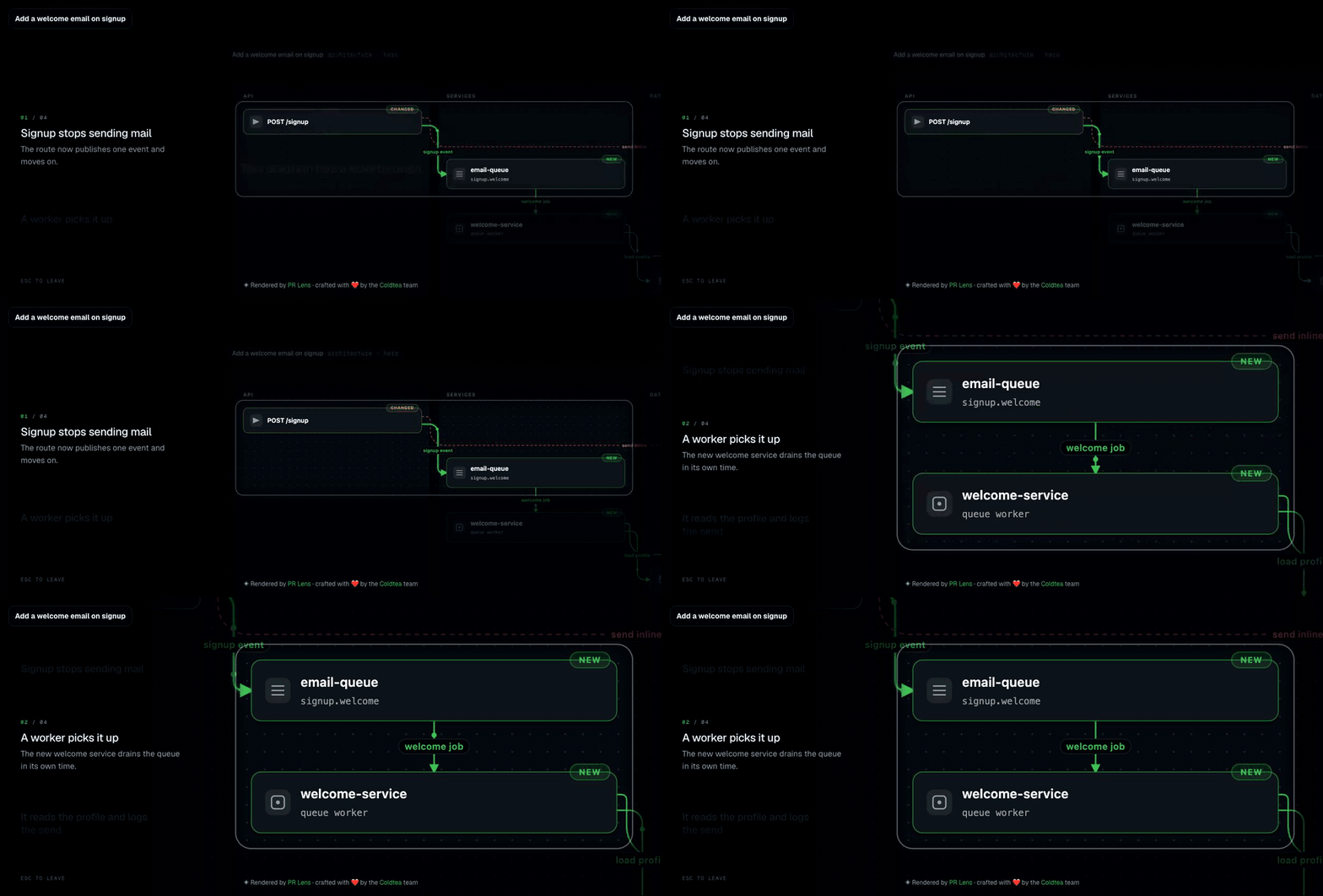
You can press play on that one yourself: it is a live canvas at prlens.dev/c/uSdxMcPBFwhfgfaGh-dveQ, and the W key starts it.
Four sentences of body, 214 characters between them. Read them in order and you have the change: the route publishes, a worker drains, the worker reads and logs, the old mailer goes. Every line is a statement about behaviour, anchored to a component you can see on the page, which is what separates a tour from a change log.
A good walkthrough is a handful of sentences and a camera, and every one of them is checked against the picture it points at.
What the canvas does with a step
Every PR Lens comment links to a canvas. Press play, or the W key, and the diagrams hand the camera over.
Everything outside the step dims under a veil with a soft-edged hole over the focus and a neutral rim around it. The veil sits inside the transform world, so it rides the camera rather than fighting it. The camera flies to the union of the boxes of everything the step named, with a little air around them, and never zooms past twice life size, so a step focused on one small card does not arrive as a wall of pixels.
The step headings sit in a column beside the pictures, one per step, with the active one scrolled to the middle so your eyes stay still while the diagram moves. Below 760 pixels of window that column becomes a sheet at the foot of the screen instead.
The controls are the ones you would guess. Right arrow, down arrow or space for the next step; left or up to go back; the steps cycle, so past the last one is the first. Escape leaves. 1 fits the whole strip. If you pan or zoom mid-step, the walkthrough does not fight you: it steps aside, a small pill appears saying you are looking around, and Enter puts you back where you were. Leave a walkthrough halfway and pressing play again resumes on the step you left.
Each step writes itself into the URL fragment, so #s=2 is a link to the second step of the tour. That is the thing you paste into a thread when someone asks which part you meant.
The first time a browser plays one of these, the play button carries a ring and a short prompt appears. Every browser after that is left alone.
Why this is not a video
I like screen recordings. I have made plenty. They are the wrong artifact for a pull request, for four reasons that have nothing to do with production quality.
A recording goes stale on the next push and nobody re-records it. The walkthrough is a field on the same document that produced the diagram, so it is regenerated when the diagram is. When a stored map of a repository is carried forward by a patch, the tour is pruned along with it: a step loses the names of things that are gone, a step left pointing at nothing is dropped, and a tour cut below two steps is dropped whole, because one step is a caption.
A recording cannot be checked. A walkthrough can, and is. The validator refuses a step that names an id the document does not have, or stages a diagram the document does not draw, and it collects every problem in one answer rather than one per attempt. On top of that, the app refuses a canvas push whose walkthrough does not resolve against the pictures actually drawn, and names the first step that is wrong. The push is the last moment anyone is still around to fix it. A canvas is a link an author hands to someone else, and a step that opens on a rim around nothing is worse than no tour.
A recording is not addressable. #s=2 is a link to a moment that survives the tour being regenerated, because it addresses a step rather than a timestamp.
And a recording asks for your full attention in real time. Four headings and four lines of body is something a reviewer skims in fifteen seconds and then decides whether to walk properly.
When not to write one
If the whole change is one small diagram, skip it. A single step would repeat the title, and the contract will not let you ship one step anyway.
Everything else is worth a tour: more than one diagram, a diagram with several changed parts, or any ordered flow. Agent-written pull requests are usually in that bucket, because they arrive without the narrative structure a human author would have imposed on the commits. Agent pull requests lose the narrative goes into that; a walkthrough is the cheapest way to put the narrative back after the fact.
Writing one
If a coding agent is drawing the change, the skill tells it to write a walkthrough for anything non-trivial and to aim for three to seven steps. If you are writing the document by hand, the rule I use is one step per decision a reviewer has to accept, in the order they have to accept them, and never a step that only says a file changed.
The reader who most needs it is not on your team and is not going to read the diff. How to explain a pull request without walking someone through the diff covers handing that link to a stakeholder, and how to visualise a pull request as a diagram covers getting the diagram the tour plays over in the first place.
Questions people ask
How do I do a walkthrough of a pull request?
- Pick three to seven moments in the change, in the order a reader needs them. For each one, name the diagram it happens in, name the components it touches, and write one line about what changed there. Then hand over a link that plays those steps rather than a recording of you talking over your screen.
How many steps should a pull request walkthrough have?
- Three to seven is the range that works. The PR Lens contract allows two to twelve, and refuses a walkthrough below two steps, because a single step is a caption rather than a tour. Past about seven, the reader has stopped following and started skimming.
Is a screen recording a good way to explain a code change?
- It is better than nothing and it goes stale on the next push. A recording cannot be validated against the code, cannot be searched, cannot be linked to at a specific moment in a way that survives an edit, and has to be remade by a person every time the branch moves.
Where does a PR Lens walkthrough play?
- On the canvas that every PR Lens comment links to. Press play, or the W key, and the canvas tours the change one step at a time, dimming everything outside the step and flying the camera to the parts it names. You can pan and zoom mid-step and resume where you left off.
What happens to a walkthrough when the code changes?
- It is regenerated with the diagram on the next push. When a stored map is moved forward by a patch, any step that names something the change removed loses those names, a step left pointing at nothing is dropped, and a tour left with fewer than two steps is dropped whole.
Sources
Keep reading
Turn it on
Add PR Lens to GitHub, GitLab or Bitbucket, and every new pull request is explained and reviewed. Or paste the prompt into the coding agent you already use